RECONCILE A CHECKING ACCOUNT

Created by Shelli Dikeman, Modified on Tue, 2 Dec, 2025 at 2:20 PM by Shelli Dikeman

  1. From the Dashboard, click on the Register icon.

 

A close-up of a white box

AI-generated content may be incorrect.


2. You will then navigate to the Reconcile icon.

 

A close-up of a computer screen

AI-generated content may be incorrect.


3. You will enter your statement date and ending balance. Next click on Continue.
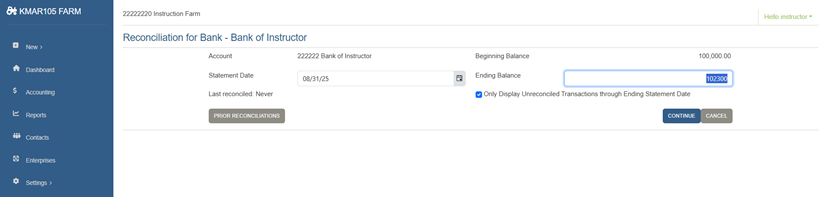
 

A screenshot of a computer

AI-generated content may be incorrect.


4. Check the transactions that cleared on your statement. Your difference should be zero. Click Finish Reconciling.
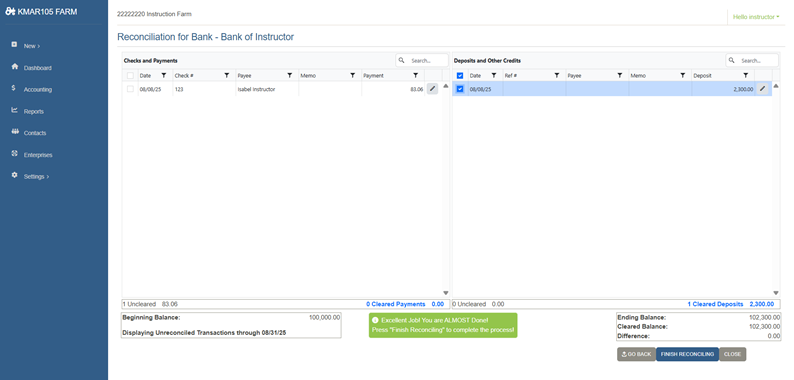
 

A screenshot of a computer

AI-generated content may be incorrect.


Was this article helpful?

That’s Great!

Thank you for your feedback

Sorry! We couldn't be helpful

Thank you for your feedback

Let us know how can we improve this article!

Select at least one of the reasons
CAPTCHA verification is required.

Feedback sent

We appreciate your effort and will try to fix the article